Office Secret Santa, from one link
· Updated · 5 min read
Post one link in the team channel. Everyone adds a wish list, Humbugg draws the names, and each person asks their match questions without anyone in the office finding out who has whom.
Set it up before the team meeting
Create the exchange
Set a spending limit, the exchange date and, if you like, a date joining closes.
Post the link
Drop it in Slack, Teams or an email. Colleagues join in their browser.
Let people fill in their lists
Likes, sizes, allergies and things to avoid, plus a delivery address for anyone remote.
Draw
When everyone is in, press draw. Each person sees only their own match.
Next to the invite link, “Copy a message for your team” gives you a short plain-text post with the link, the budget, the join-by date and when and where the exchange happens, ready to paste into Slack or Teams.

Remote and hybrid teams
When gifts are sent by mail, each person can add a mailing address that only their Secret Santa sees after the draw. When gifts go to the office, anyone remote can choose to have theirs sent home instead. Givers mark a gift purchased and sent, and the recipient marks it arrived, so nobody has to ask in the team channel whether a parcel turned up.
Ship every gift to the office
Home addresses are where office exchanges get stuck. Plenty of people would rather a colleague from another floor did not have theirs, and the organizer should not have to collect them.
With Plus, gifts go to one address you choose: the office, the front desk, or anywhere else that takes parcels. Nobody is asked for a home address. After the draw, each giver sees the office address and their recipient’s name, which is everything the parcel needs.
Hybrid teams can have both. Each person chooses where their own gift goes: the office, or their own address if they work from home. A home address is seen only by that person’s Secret Santa, after the draw. You see how many gifts go to each, never who chose what or where they live.
If your Plus ends, the exchange keeps the office address it has, and you can switch it to in person or home delivery at any time.
Colleagues who never click the link
Every office has them: the people who mean to join and never do. With Plus you can put them in the draw yourself. Paste their names and work emails, choose Add to the draw, and they are in. Nobody has to make an account.
Humbugg emails each of them that they are in. After the draw, it emails them a link to see who they are giving to. Their Secret Santa sees their name straight away, and their wish list once they sign in with that address and add one. You still never see who drew whom.
Keep the link inside the company
A link posted in the team channel can travel. With Plus you can say which email addresses may join, such as @acme.com: anyone who opens the link signed in with another address is told the exchange is for your company and asked to sign in with their work email. People you invite by email can always join, whatever their address, and so can you and your co-organizers.
Asking about a colleague without asking them
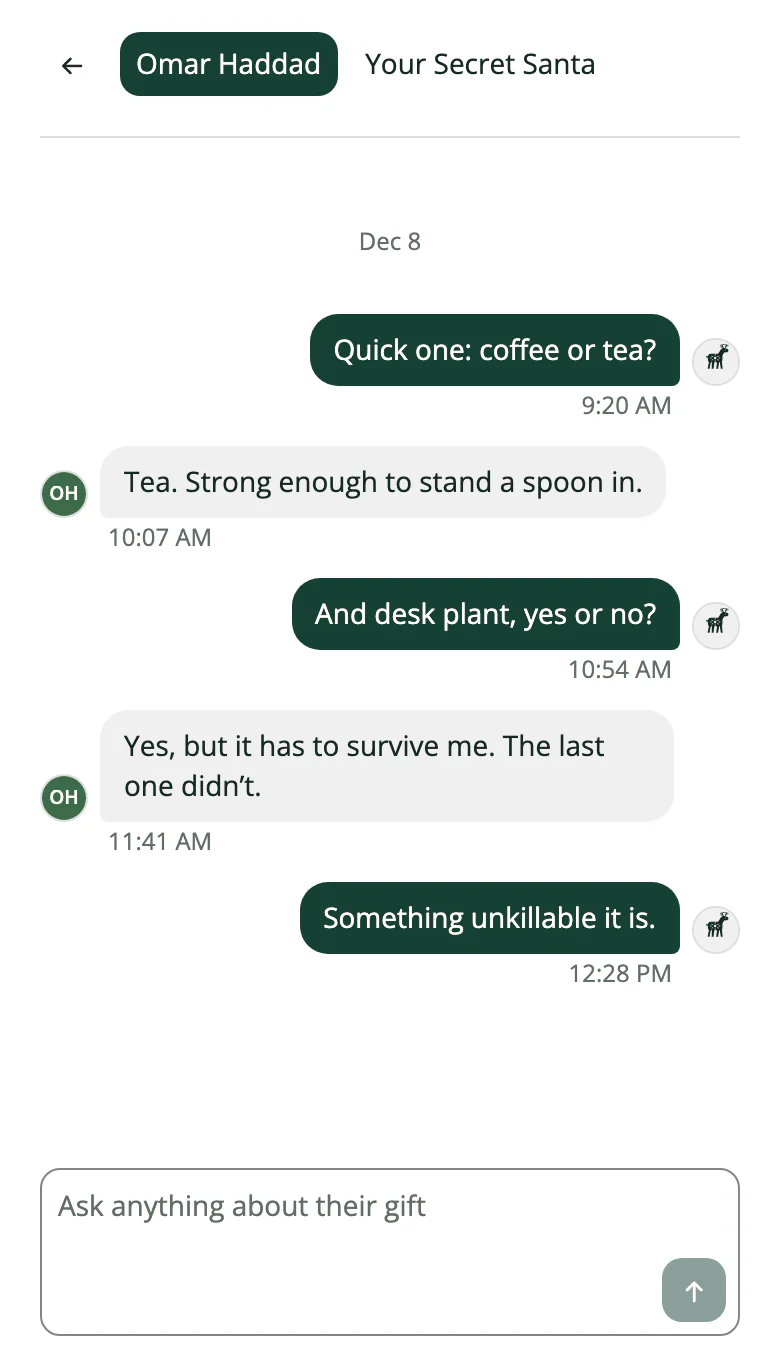
You drew someone from finance you have spoken to twice. In Humbugg you can ask them directly: coffee or tea, desk plant or no desk plant. They see the question from “Your Secret Santa” and reply. Humbugg never says who is typing.
Teams bigger than six
Free covers an exchange of up to 6 people. Most office exchanges are bigger, so they need Plus, which the organizer buys once and which covers every exchange they run. With Plus you paste the team list from your email or a spreadsheet, Humbugg invites everyone at once, shows who has not answered and sends the reminders. Plus also puts colleagues who won’t sign up in the draw for you, ships gifts to the office (or home, for whoever works remotely), and lets you add a co-organizer or a late joiner after the draw. Colleagues never pay.
On any plan, the organizer report shows who has joined, who has a wish list and how many gifts are bought, sent and received. Copy it into the team channel or download it as a spreadsheet for whoever is helping. It never says who is giving to whom.
Office Secret Santa etiquette
- Keep the spending limit modest and state it up front, so nobody overspends to impress.
- Make joining optional. People who sit it out should not have to explain why.
- Steer away from joke gifts that could embarrass someone in front of colleagues.
- Set the exchange date before the last week of December, when half the team is away.